The fastest way to build a good maze in Minecraft is to stop designing it in Minecraft. Generate a real maze layout first, then transfer it to blocks. You have three routes: build it by hand from a printed plan, place the walls with /fill commands, or let a datapack or server plugin generate the whole thing for you.
I have done all three, mostly on my kids' survival realm, and this guide covers the full workflow: designing the layout, getting the scale right, the three build methods with real numbers, which wall blocks work, and the gameplay details (lighting, loot, a visible goal) that decide whether anyone actually wants to run your maze twice.
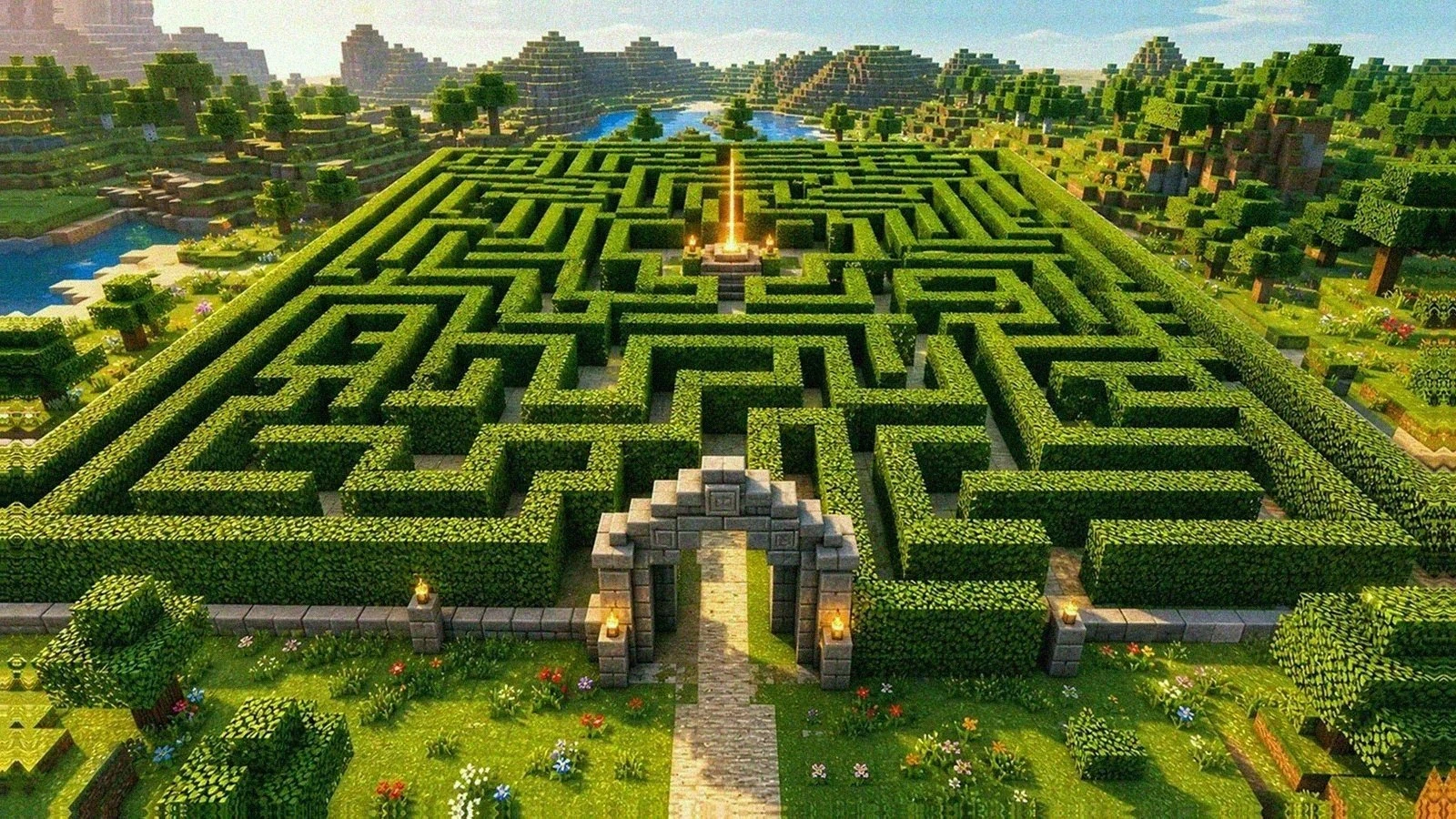
step 1: generate the layout before you place a single block
A maze you improvise corridor by corridor almost always comes out wrong in the same two ways: the dead ends are short and obvious, and there is secretly more than one route because you lost track of a junction. A generated maze is guaranteed to have exactly one solution and dead ends that actually commit.
Open the maze generator, pick a rectangular maze, and choose a size you can realistically build:
- 10×10 cells — a first build, or a maze for younger kids. Half an afternoon by hand.
- 15×15 cells — the sweet spot. Big enough to get lost in, small enough to finish.
- 20×20 cells and up — commit-a-weekend territory, or use commands.
Cell count converts to blocks like this: with corridors 2 blocks wide and walls 1 block thick, a maze needs cells × 3 + 1 blocks per side. So 10×10 cells is a 31×31 block footprint, 15×15 is 46×46, and 20×20 is 61×61. Check the flat ground you actually have before you fall in love with a size. Our maze sizes explained post covers how those grid sizes feel to solve, and the difficulty carries straight over into Minecraft.
Then get the plan somewhere you can see it while you build. I print it — a paper plan next to the keyboard survives alt-tabbing much better than a browser tab, and you can cross off rows with a pencil as you place them. Download it as a maze PDF, or keep the SVG open on a second screen if you prefer (PDF vs SVG explains the difference).
This video is a good overview of the generator-first mindset applied inside Minecraft itself:
step 2: get the scale right
Three numbers matter before the first block goes down.
Corridor width: 2 blocks. One-block corridors feel claustrophobic and make two players fight for the same space. Three-block corridors read as rooms, not paths, and inflate the footprint by half. Two is right for almost every maze.
Wall height: 3 blocks. A player cannot jump onto a 2-block wall, so 2 is technically escape-proof. It is not view-proof. On our first family maze I built the walls 2 high, and within about ten minutes my eldest had switched to third-person camera, floated the view over the walls, and read the entire route from above. Three-block walls block that camera trick and the over-the-shoulder sightlines, and the maze went from "solved before dinner" to genuinely contested. Build at 3.
Wall thickness: 1 block. Thicker walls look imposing but double your material count and your build time for zero puzzle value.
Flatten the site first. For a 15×15-cell maze, clear a 46×46 area plus a couple of blocks of margin: stand at one corner, note the coordinates (F3 on Java), and clear with /fill x1 y1 z1 x2 y2 z2 minecraft:air, then lay a floor one block below with the same command and your floor block.
step 3: build it — three routes
by hand, from the printed plan
This is the slow route and the one my kids and I keep coming back to, because the build is half the fun. The method that works:
- One paper cell = one 3×3 block area (2 corridor + 1 wall). Every printed square maps to the same footprint, so you can count squares on paper and count blocks in game.
- Lay the outer boundary first. It squares up the whole build and catches measurement mistakes while they are still cheap.
- Build wall lines, not corridors. Follow each continuous wall line on the printout and place its full run before moving on. It is much harder to lose your place than hopping cell to cell.
- Drop a checkpoint marker every 10 cells. I place a single contrasting block (gold, in our case) at every tenth column along the boundary. When you misplace a wall — you will — the markers tell you which 10-cell band to re-check instead of recounting from the corner.
Real numbers from our realm: a 20×20-cell maze (61×61 blocks, stone brick walls 3 high) took me and two kids a rainy Saturday afternoon plus one school-night evening — roughly four hours of actual building, not counting the creeper incident covered below.
with /fill commands
On Java Edition, /fill places a box of blocks between two coordinates:
/fill <x1> <y1> <z1> <x2> <y2> <z2> <block>
The workflow: build the outer shell with one command using the hollow mode, then fill in the interior walls as long thin boxes, one command per wall run, reading the runs off your printed plan.
For a maze floor at y=64 with 3-block walls, a 46×46 outer shell is:
/fill 100 65 100 145 67 145 minecraft:stone_bricks hollow
Then each interior wall run is a 1-block-thick box at the same heights, for example:
/fill 103 65 103 103 67 121 minecraft:stone_bricks
A 15×15 maze has on the order of 60–80 wall runs, so this is still real work — but it is minutes-per-wall instead of minutes-per-block, and re-running a corrected command is free. Put frequently reused commands in a command block if you are iterating on a design. Full syntax and the hollow/outline/replace modes are on the Minecraft Wiki /fill page.
with generators, datapacks, and plugins
If you want the maze to exist now:
- Bibliofile's Minecraft maze generator is the one I recommend first. You set width and height in paths, wall thickness, wall height, and wall block; it shows a preview with the exact block dimensions and downloads a
.mcfunctionfile. Drop that into a datapack, run the function, and the maze appears where you stand. - Maze Generator on Modrinth is a server plugin that generates large labyrinths with customizable themes — the right tool if you run a server and want fresh mazes on demand.
- TangledMaze takes a different approach: you select an area with a WorldEdit-style wand, including curved and irregular shapes, and it fills the selection with a maze. Best for mazes that have to fit an existing space.
- WorldEdit itself won't generate a maze, but
//setand//wallsmake the site prep and outer boundary a ten-second job.
This one-second command-block generator is worth watching just to see how far the in-game route can be pushed:
step 4: pick your wall block
| Block | Look | Worth knowing |
|---|---|---|
| Stone bricks | Classic dungeon | Cheap at scale, reads clearly, cracked/mossy variants add age for free |
| Leaves (any type) | Hedge maze | Hand-placed leaves never decay; if you /fill them, add [persistent=true] so they cannot rot away from missing logs |
| Dark oak fences + vines | Overgrown forest | You can see through fence gaps — decorative mazes only |
| Deepslate bricks | Horror / dungeon | Very dark; skip torches in favor of hidden light (see below) for maximum dread |
| Sandstone | Desert temple | Smooth + chiseled variants make great banded walls |
| Glass | Disorienting | Sightlines everywhere but the route still binds you — closest thing to a mirror maze in Minecraft |
The leaf-decay note is the one that burns people: naturally, leaves within decay distance of a log stay put and everything else dissipates, but leaves you place by hand are flagged persistent automatically (details on the Minecraft Wiki leaves page). Adding [persistent=true] to command-placed leaves costs nothing and removes the doubt.
step 5: gameplay polish
Light the corridors, or mobs will move in. As of current Java Edition (1.18 and later), hostile mobs need block light 0 to spawn — so any light reaching the floor stops spawns (mob spawning rules). A torch every 10–12 blocks is plenty. I learned this the loud way: I left the northwest quarter of our first maze unlit overnight, and a creeper blew a crater through two corridors. The kids treated the repair as bonus content. I did not.
Two tips from that repair. First, put torches on only one side of the corridors — we accidentally placed ours all on the right-hand wall, and my youngest worked out that "follow the torches" got her to the exit. That is the wall-follower method from how to solve a maze, discovered independently by a seven-year-old, and our maze solving algorithms post explains why it works. If you don't want the hint in your maze, alternate sides. Second, hide lighting in the floor (glowstone under carpet) for horror builds.
Reward the dead ends. A chest with a few emeralds or arrows at the deepest dead ends turns wrong turns into content instead of pure frustration. Deep dead ends are exactly what makes mazes hard — how maze difficulty works covers this — so pay the player for reaching them.
Make the goal visible. Put a beacon (or just a glowstone pillar) at the exit, tall enough to see over the walls. Being able to see a goal you cannot route to is the trick Longleat's central tower plays on visitors (famous mazes around the world), and it works exactly as well in blocks.
Time the runs. Simplest version: a lever-activated redstone clock and an honest sibling with a stopwatch. Fancier version: pressure plates at start and finish driving a scoreboard timer from a repeating command block.
minecraft maze ideas
- Kids' first maze — 10×10, stone brick, torches everywhere, chest of cookies at the goal. Pair it with an easy printable maze of the same layout so they can solve it on paper first, then run it.
- Garden hedge maze — leaves over a grass path floor, flower beds in dead ends, for a build that looks good from a hill.
- Deepslate dungeon — underground, dim hidden lighting, loot-and-monster rooms at dead ends (light those rooms' spawn spaces deliberately if you want mobs).
- Multi-level maze — ladders and drop-shafts connecting two stacked layouts. Generate two different mazes and connect them at three points.
- PvP hunt maze — one hunter, several runners, no third-person allowed (server rule), beacon goal. Our best family-server evening to date.
faq
How do you make a maze in Minecraft fast?
Generate the layout instead of designing it in game, then place it with commands. Fastest of all: use Bibliofile's generator to download a .mcfunction and run it from a datapack — the maze appears in seconds. On a server, the Maze Generator or TangledMaze plugins do the same with one command.
How tall should Minecraft maze walls be?
Three blocks. Players cannot jump onto a 2-block wall, but they can see over it in third-person camera, which gives the route away. Three blocks kills both the sightline and the camera trick without costing much extra material.
How do I stop mobs spawning in my maze?
Keep the floor lit. In current versions, hostile mobs only spawn at block light 0, so a torch every 10–12 blocks makes the whole maze spawn-proof. For dark-looking builds, hide glowstone under carpet or use low-light blocks like sculk-adjacent decor with concealed light sources.
Can I generate a maze automatically in Minecraft?
Yes, three ways: a .mcfunction from an online tool (works in any Java world with a datapack), a server plugin like Maze Generator or TangledMaze (Modrinth), or a redstone/command-block machine if you want the generator itself to be the build project.
What size should a Minecraft maze be?
Multiply maze cells by 3 and add 1 to get the block footprint: 10×10 cells → 31×31 blocks, 15×15 → 46×46, 20×20 → 61×61. Start at 10×10 or 15×15; hand-building a 20×20 took our family about four hours.
next step
Design the layout first and the Minecraft part becomes assembly instead of guesswork.
- Generate your plan with the maze generator and print it via maze PDF.
- Not sure how big to go? Maze sizes explained maps grid size to difficulty.
- Want the theory behind why your torch line solved the maze? Read maze solving algorithms.
- Need a screen-free version? Print our Minecraft-style mazes: a pixel pickaxe, a sword, a diamond, and cave runs, each with an answer key.
Sources and further reading: